Etecmo Simulation Suite
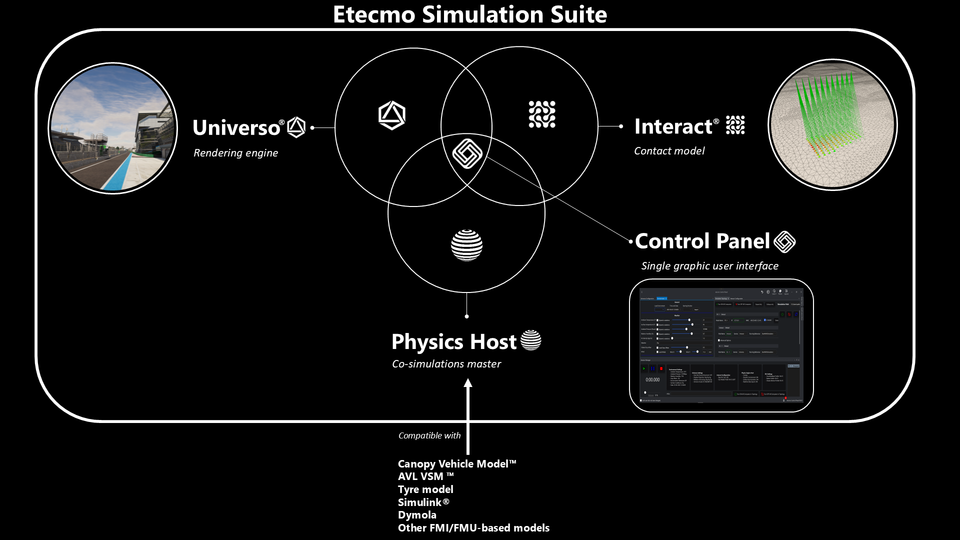
Universo®, the rendering engine
Universo is a 3D Physically Based Rendering (PBR) engine specifically developed for simulation. It uses real-time ray tracing to render the world with the highest possible level of realism. This technique, which will be explained in more detail in a future article, enables complex light interactions to accurately follow the laws of physics.
For example, reflections seen in a window are physically correct, based on the position of the lights, the angle of the surface, and the observer’s point of view.
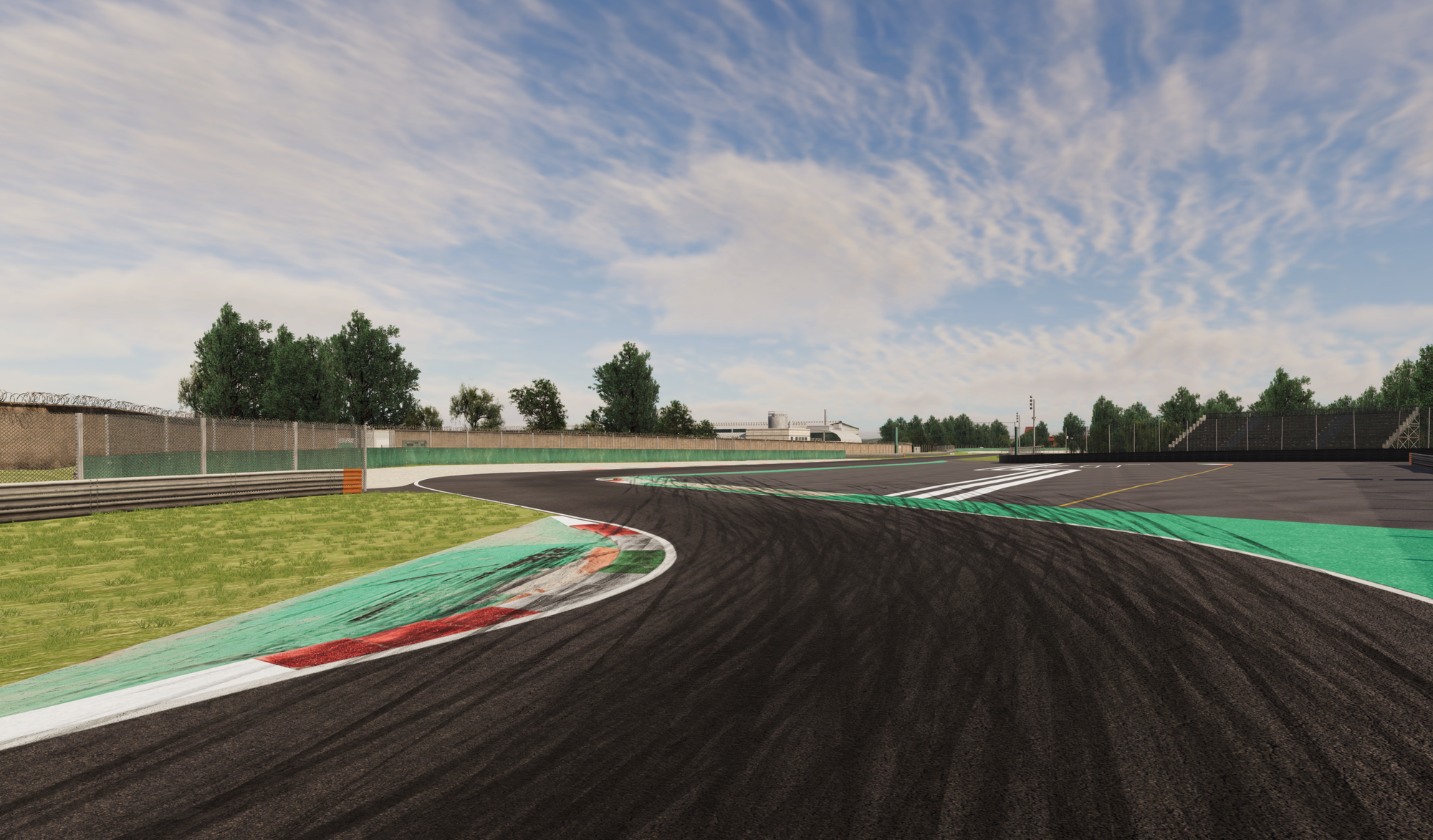
Among its characteristics, we can highlight that it’s a multi-Image generator cluster, with synchronized sim state across all nodes, to ensure at the same time, a maximum quality of image and fluent, without tearing or physics inconsistency between clusters.
The FOV, or Field Of View, is unlimited in the vertical and horizontal axis.
Universo integrates VIOSO core, which does the warping a blending automatically, calibrating all the clusters together, allowing the image to be perfectly synchronised and physically correct. That’s right, no more infinite hours correcting manually the position of the projectors every time you turn on your simulator.
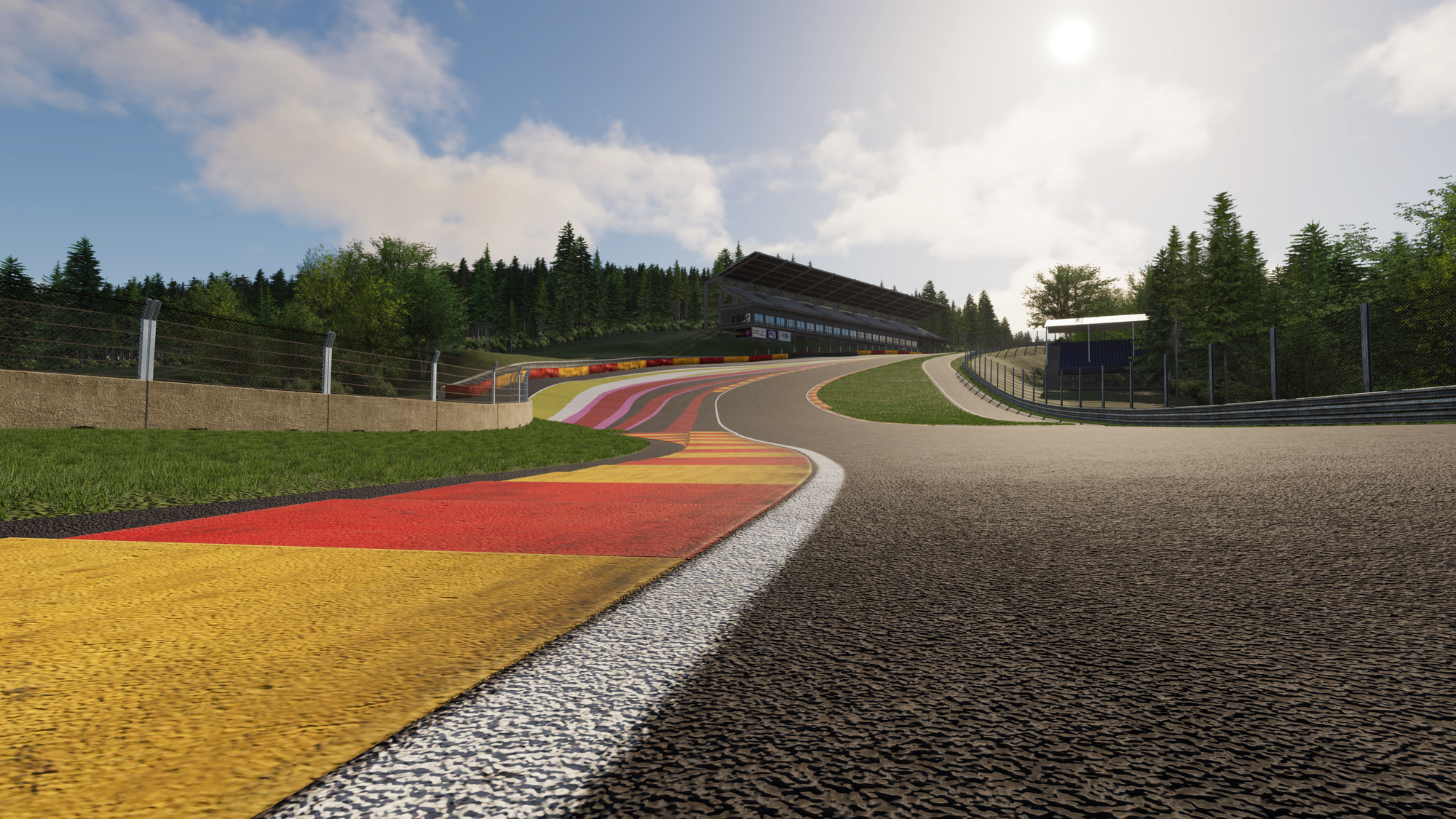
Another defining characteristic of Universo is that its environments are not merely geolocated — they are reconstructed as true Digital Twins of real-world locations.
Each environment is generated from high-precision LiDAR scans captured using state-of-the-art surveying technologies. The resulting datasets are processed into accurate 3D representations that preserve real-world geometry, surface detail, and elevation changes. Every scene is positioned at its exact latitude and longitude, correctly oriented, and aligned with real-world topography.
Because of this, Universo does not simulate an approximation of a place — it simulates the place itself, in digital form.
This approach enables physically accurate environmental behavior. When a specific date and time are selected, the sun’s position is computed according to astronomical models for that exact location. Consequently, lighting conditions, shadow lengths, and solar angles precisely match those that would occur in the physical world at that moment.
In this sense, Universo environments function as operational Digital Twins: physically grounded, spatially accurate, and temporally coherent replicas of real-world locations.
Interact®, the contact model
Interact is the software inside the ecosystem that calculates the contact between the model and the surfaces in the environment. Its primary application is high-fidelity tyre–terrain interaction, though it also supports other contact scenarios such as vehicle bottoming, vehicle-to-vehicle contact, and vehicle-to-barrier interactions.
It is compatible with external tyre models, like MegaRide Physical Models (RIDEsuite) or FTire as examples, as well as compatible with standard laser scanned surfaces.
Its greatest strength lies in its computational resolution and speed. Interact can process up to 1000 contact points per tyre, computing the tyre contact patch at frequencies of up to 10 kHz. This enables extremely detailed and temporally precise contact modeling, suitable for advanced vehicle dynamics simulation and high-performance applications.
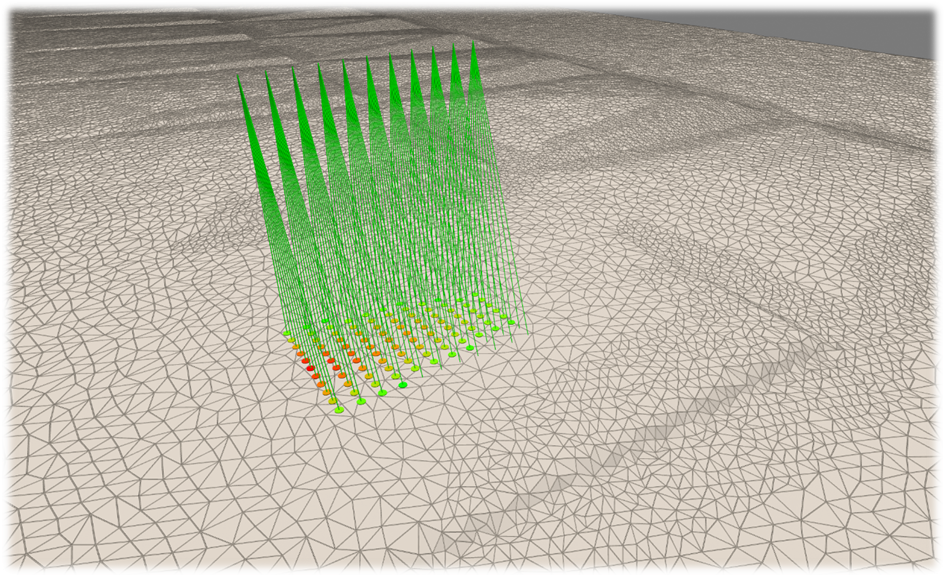
It is easy to understand how transformative Interact can be for vehicle dynamics analysis. Applications such as tyre pressure mapping, camber sensitivity studies, and kerb riding behavior can be evaluated with a level of detail that goes far beyond traditional contact models.
Rather than representing tyre contact as a simplified point or a limited set of discrete interactions, Interact resolves the full contact patch as a measurable area. This allows precise visualization and analysis of how the contact patch increases or decreases in size under different operating conditions.
Through integration with our Data Acquisition System, Interact also outputs high-resolution contact-related channels, effectively functioning as a virtual sensor at the tyre–terrain interface.
But that is a topic we will explore in future articles.
Physics Host, the co-simulation master
The Physics Host is an abstraction layer of the physical models, enabling the integration of a wide range of user-specific models, including Canopy Realtime DIL Model™, AVL VSM™, tyre models, Simulink, Dymola, and other FMI/FMU-compliant models.
As the co-simulation master, the Physics Host coordinates the simulation loop, determining the precise timing and execution order of each integrated component to ensure consistent, synchronized interactions across all models.
Dynamic environmental conditions—such as temperature, humidity, wind, and grip—are simulated in real time. Crucially, every parameter and event, including those that evolve during the simulation, is recorded in the database. This allows simulations to be reproduced deterministically at any time, ensuring full traceability and repeatability.
The system provides real-time telemetry, while also supporting execution on both soft real-time and hard real-time platforms with low latency.
Control Panel, the graphic user interface
The Control Panel is the only part the user interacts with. It is designed with the purpose of having all the changes only one click away, saving hours of work if its compared to the traditional way of operating a driving simulator.
Do you need to change the vehicle model to another one from a different supplier? It is only one click away.
Do you need to replicate a previous test? All the parameters are stored in a database (even the variables that come from the models themselves) with filters, so any previous test is easy to find and repeatable.
Do you need the acquired data channels to be stored with specific names so they can be immediately used in your own acquisition system for analysis and comparison? That’s also a single, straightforward step.
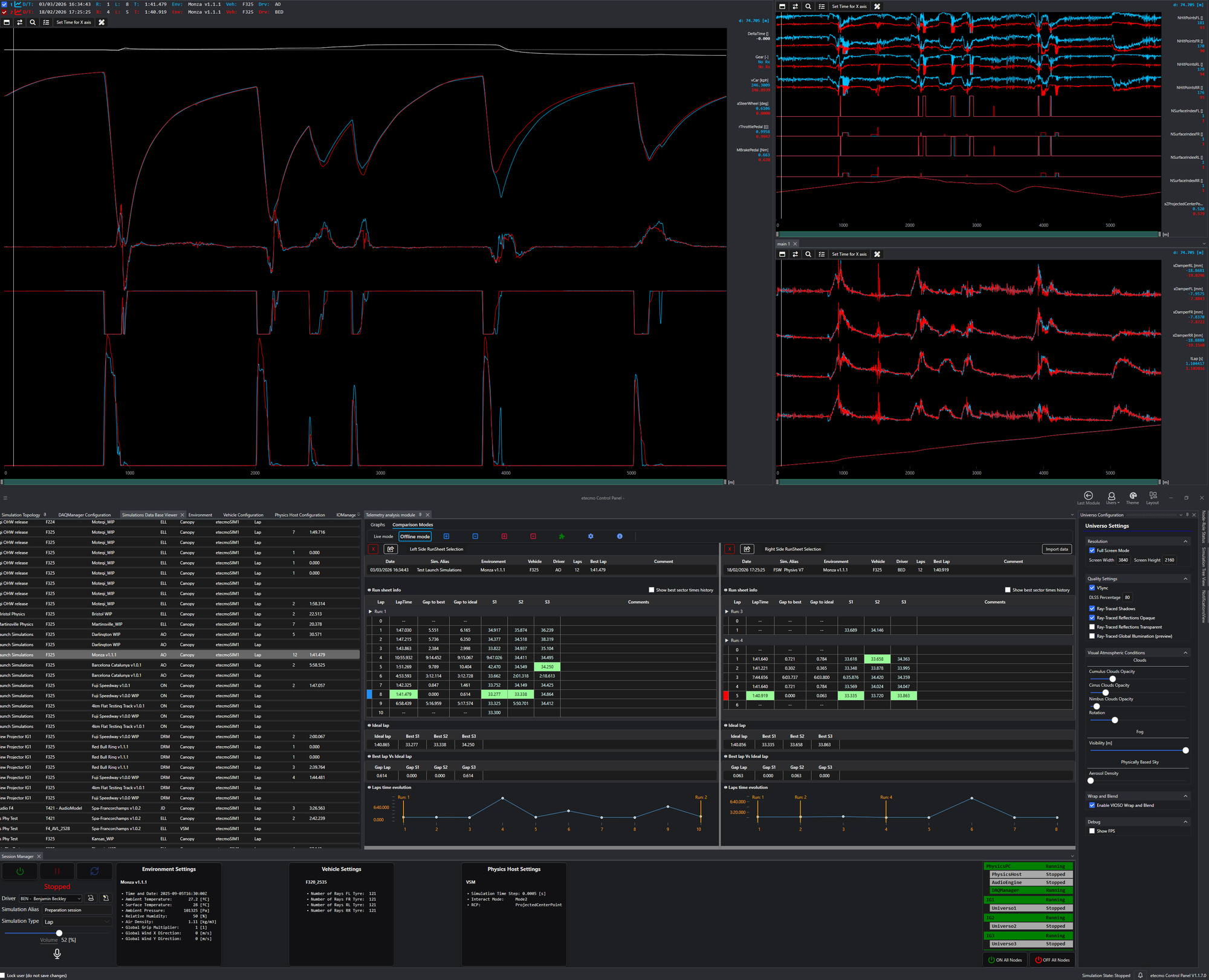
All of this while being able to analyse your data in real-time, and compare it with any simulation previously done and stored in the database, or even plotted against real data from acquisition systems such as WinTAX, PI, etc...
The list of Control Panel applications is too extensive to cover in a single article, but we will explore them in detail as we dive into the engineering applications of the Etecmo Simulation Suite.
Other parts of the ecosystem
The components described above are the core elements of the Simulation Suite, but many additional modules are integrated into the ecosystem. While they are less central, they still play important roles and deserve a brief mention here:
Audio Engine
- Build around the well known, industry standard FMOD engine, which allows for excellent audio quality in-simulation and provides a simple, yet very powerful user interface to easily create and tune new sounds for any vehicle and environment no matter how complex and detailed.
- Flexible sound selection logic. Easily choose to have an environment specific rolling sound, vehicle - environment specific combination, just a generic sound or a custom mix of generic and specific sounds without any fuss or tedious repetitive copy paste tasks.
- Thanks to our Physics Host middleware, the Audio Engine seamlessly integrates with different vehicle models.
- Audio Engine has a dedicated module on Control Panel for conviniently controlling the volume of all sound sources in real-time during the simulation, allowing to fine tune every detail of your simulation. Wind should sound a bit more but the engine is okay? Volume up the wind and just the wind!
IOManager
The IOManager allows the user to configure all sorts of input methods to pass information like steering angle, throttle position and all their friends to the Physics Host.
Likewise, it conveniently offers a way to take information out of the simulator. Both input and output can be configured to work as CAN Signals, DirectInput (joystick) or UDP signals or any combination of them.
This way, one may grab a CAN dashboard from any relatively recent car, throw it in the simulator, configure the correct CAN Signals and make it work with the live data of the simulator.
This sums up how a simulation ecosystem works, follow our next articles where we will show various applications, or how simulation helps manufacturers and teams to develop from their headquarters their vehicles.